
Anthropic’s new AI agent for Slack acts under an admin-configured access bundle rather than each user’s own credentials. Here’s how that model works, what admins should understand and how to securely configure it.
Key takeaways
- Claude Tag, Anthropic’s newly launched AI agent for Slack, acts on connected services using shared credentials an admin configures for a workspace or for a specific private channel, not the credentials of the user tagging it.
- Claude Tag uses the service-identity pattern, like deploy bots, workflow automations, and incoming webhooks, rather than per-user OAuth delegation. As a result, one admin-configured bundle serves everyone in the channel.
- Inviting someone to a channel where Claude Tag is present lets them converse with Claude and see its output there. What Claude can access is fixed by the admin-configured bundle, and organizations can require claude.ai login and role-based access control before a user may interact with Claude at all. Channel invitations do not confer new permissions on the invitee.
- As part of Tenable’s ongoing partnership with Anthropic, Tenable Research worked with their security team through coordinated disclosure.
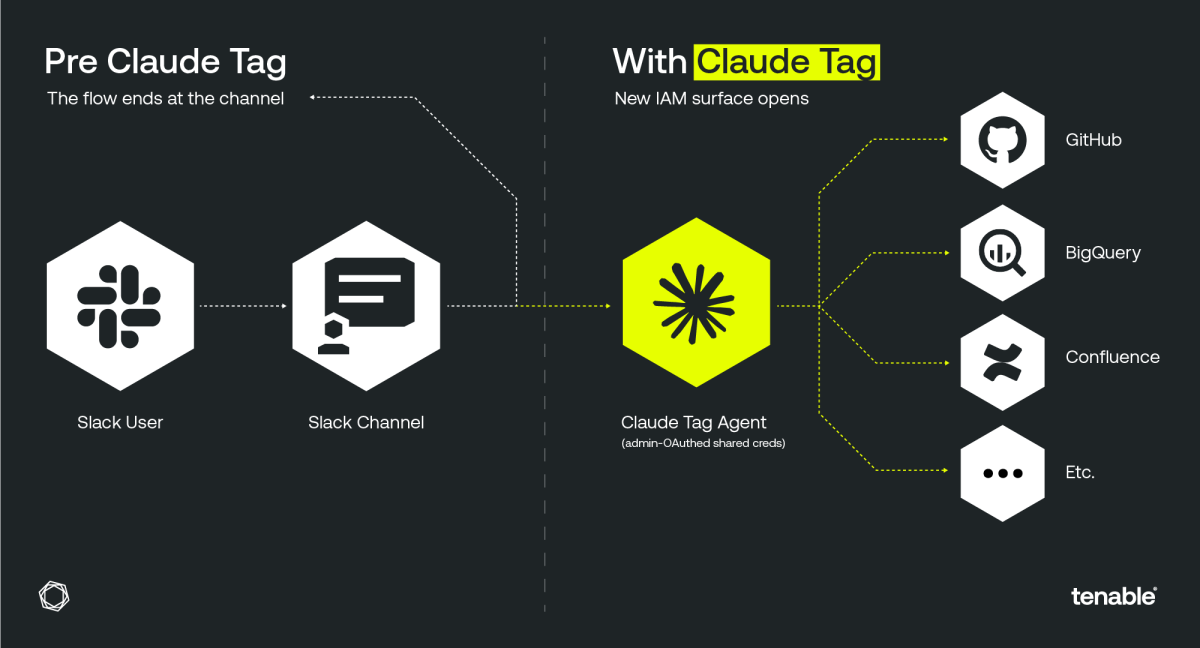
Claude Tag lets Slack channel members direct an agent whose reach is defined by the admin-configured access bundle. (Source: Tenable Research)
What is Claude Tag?
Claude Tag is a multiplayer AI assistant that lives inside Slack. With Claude Tag, which was released by Anthropic on June 23, 2026, anyone in a channel can tag @Claude to hand off tasks, run autonomous jobs over hours or days, and watch the work unfold in-thread.
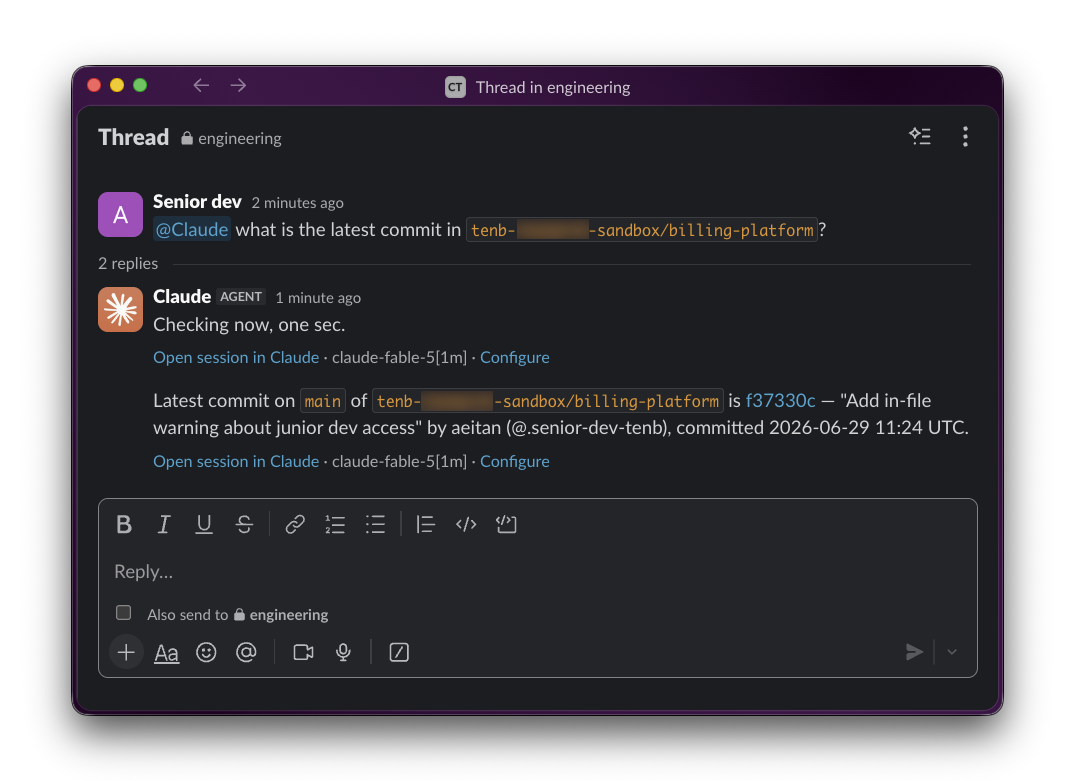
Claude Tag in a Slack channel, using the attached access bundle to read from a connected GitHub repository. The agent responds to any channel member within the bundle's scope. Source: Tenable Research.
In a traditional 1-on-1 AI interaction, such as a chat UI, a command-line interface (CLI), or a Model Context Protocol (MCP)-connected app, the agent acts as you. Claude Tag keeps that model in direct messages: a DM runs on the sender’s own claude.ai account, using that user’s own connectors. In shared channels, however, Claude Tag is a multiplayer agent: It serves many users at once, and no single user’s credentials define its access. There, the agent is given its own identity, with its own permissions, configured once by an admin, and reused by everyone who tags it.
The controls governing that access are:
- The admin’s bundle configuration determines what the agent can do
- The channel determines where it participates and what it can see
- Organization-level Claude Enterprise controls, such as required claude.ai login and role-based access control, govern who can direct it
Claude Tag also differs from per-user Slack integrations. Slack’s own GitHub integration, for example, uses each user’s personal GitHub OAuth token. When a user runs /github in a channel, the integration acts as that user, and sees only what that user can see. The same is true for Slack’s Jira and Asana apps.
Claude Tag works the other way: One shared credential applies to every user in the channel. For GitHub, that credential is a Claude GitHub App installation token scoped to a repository allowlist the organization owner configures. No individual's OAuth is used, and actions are attributed to the Claude app. Admins can restrict which repositories each channel can reach by attaching different bundles to different channels. For example, a finance channel can be scoped only to finance repos, while an engineering channel only to its own. For non-GitHub OAuth connectors (e.g., Google Drive), the bundle reuses the OAuth credential of the organization’s admin or owner who connected it.
Claude Tag’s access model
Claude Tag isn’t just a Slack bot; it’s an autonomous AI agent with its own identity, separate from any human user. When someone in a channel types @Claude, the assistant doesn’t act as that user; it acts as itself, using credentials provisioned by access bundles.
The identity model for Claude Tag has three layers:
- A Claude Tag installation bound to a Slack workspace
- Access bundles that group connector credentials configured once by an admin, such as a Claude GitHub App installation for repositories, and OAuth-approved credentials for other services)
- Scopes that define which Slack contexts, such as a workspace or a channel, a bundle is available in.
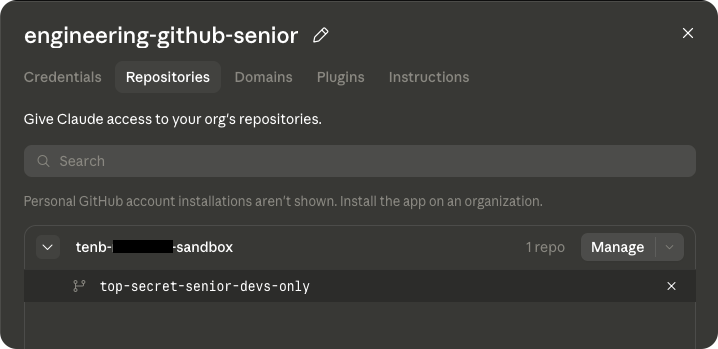
An access bundle configured attached to a single Slack channel. The bundle's scope is set by the admin, not by the users in the channel. (Source: Tenable Research)
The trust boundary that admins can control is the scope. Attaching a bundle to a channel is an admin decision: Members of that channel can then direct Claude within the bundle’s scope. For example, they can scope a GitHub app installation to an allowlist of repositories, while for other OAuth connectors they can scope the credential of the admin who connected them. Claude Enterprise admins can additionally require users to log in to their claude.ai account and restrict usage via role-based access control (RBAC), under which non-qualifying users cannot start Claude sessions and their messages in existing threads are treated as untrusted.
There’s no mapping from “the Slack user who typed @Claude” back to “what that user is allowed to access in the connected service.” The model also constrains users: Someone acting through Claude cannot bring their own privileges. Writes happen only where the agent is scoped to write, so they land in admin-chosen, visible locations rather than wherever an individual user’s credentials could reach.
Anthropic’s documentation states the model explicitly. The attach-to-scope page warns: “A bundle attached to a public channel grants its access to anyone who joins that channel. In most Slack workspaces, anyone can join a public channel, so the channel’s join policy becomes the effective access control for whatever the bundle grants. Keep elevated credentials in private-channel scopes.”
Security implications of multiplayer agents
Slack channel configuration is now part of your access-control surface. Traditional application identity and access management (IAM) is per-user: Each person authenticates and is gated against their own identity in each system. An agent like Claude Tag instead has its own identity: the admin-configured bundle defines what the agent can reach, and the channel defines where it participates and who can converse with it. Adding a user to a channel lets them direct Claude within that admin-chosen scope; organizations can require claude.ai login and RBAC before a user may direct Claude at all. You should review bundle scope and channel membership together.
Slack admins now make decisions that matter for access control. Attaching an access bundle to a channel determines what Claude can reach there. Review bundle attachments with the same rigor you apply to IAM changes, and use organization-level controls, such as required claude.ai login and RBAC) to bound who can direct Claude. Channel invites then govern who can converse with the agent within that admin-chosen scope.
You should scope bundles deliberately and pair them with organization-level controls. Keeping elevated bundles in private channels narrows where the agent participates and who can converse with it. A new channel member can see prior scrollback and converse with Claude there, but what Claude can access stays fixed by the admin-configured bundle. The right practice is minimum-privilege bundles per channel, per task, combined with those organization-level requirements.
Anthropic’s planned enhancements
Anthropic has said publicly that it plans to strengthen Claude Tag’s security offerings with two additions (see Anthropic’s June 24 post, “Agent identity in Claude Tag: a new access model”):
- Just-in-time credential grants, where a user approves a single sensitive action in the moment without permanently widening the agent’s scope
- An identity-aware overlay, adding user-level checks on top of an agent’s scope for organizations with more complex clearance structures
These are additive options layered onto the channel-scoped agent model, not a replacement for it: agent identity remains a first-class model, and organizations will be able to combine it with user-level checks, or rely on user identity alone for a given channel where it fits their needs.
Coordinated disclosure
Tenable Research approached Anthropic’s security team via HackerOne to discuss Claude Tag’s access model and worked through coordinated review. Anthropic engaged promptly, provided a detailed clarification of the product’s access model, and confirmed that the admin-experience feedback we raised has been shared with the relevant product team for consideration in the setup flow and documentation. We appreciate their thorough and professional engagement throughout.
Timeline (UTC):
- 2026-06-30 14:57 – Tenable Research submits an initial report to Anthropic via HackerOne (TRA-699).
- 2026-06-30 17:14 – Anthropic responds with a detailed clarification of Claude Tag's access model.
- 2026-07-01 9:49 – Tenable Research replies with follow-up observations regarding the admin configuration experience.
- 2026-07-02 13:41 – Anthropic confirms the feedback has been shared with the relevant product team for consideration in the setup flow and documentation.
4 ways to better secure multiplayer agents
Multiplayer agents aren’t going away. Here are four actions you can take immediately to reduce the access risks they create:
- Audit your access bundles. For every Claude Tag bundle in your organization, identify the:
- connectors it holds credentials for
- scopes it’s attached to
- users who can direct Claude in those scopes today, making that set deliberate: manage channel membership, and use organization-level controls (such as required claude.ai login and RBAC) so only intended users can direct Claude.
- Review channel membership and bundle scope together. For channels whose bundles grant sensitive reach, route invites through an approval flow and audit-log them.
- Scope bundles minimally and manage channel invite policies. Attach only the connectors and repos/scopes the channel actually needs, and configure channel-level invite restrictions so only named admins can add members. Review the named-admin list on the same cadence you review IAM role assignments.
- Opt for per-user delegation where the use case allows it. Where a shared agent identity is the right tool, such as for long-running autonomous jobs or team-owned automation, scope it minimally and manage its channels’ membership as the IAM boundary it is by default (see #2 and #3), and layer on the organization-level controls, such as required claude.ai login and RBAC where available. Anthropic has said an identity-aware overlay is planned as an additional layer on top of agent scopes.
Learn more

Tenable One
Request a demo
The world’s leading AI-powered exposure management platform.
Thank You
Thank you for your interest in Tenable One.
A representative will be in touch soon.
Form ID: 7469
Form Name: one-eval
Form Class: c-form form-panel__global-form c-form--mkto js-mkto-no-css js-form-hanging-label c-form--hide-comments
Form Wrapper ID: one-eval-form-wrapper
Confirmation Class: one-eval-confirmform-modal
Simulate Success