by Stephanie Dunn
May 26, 2016
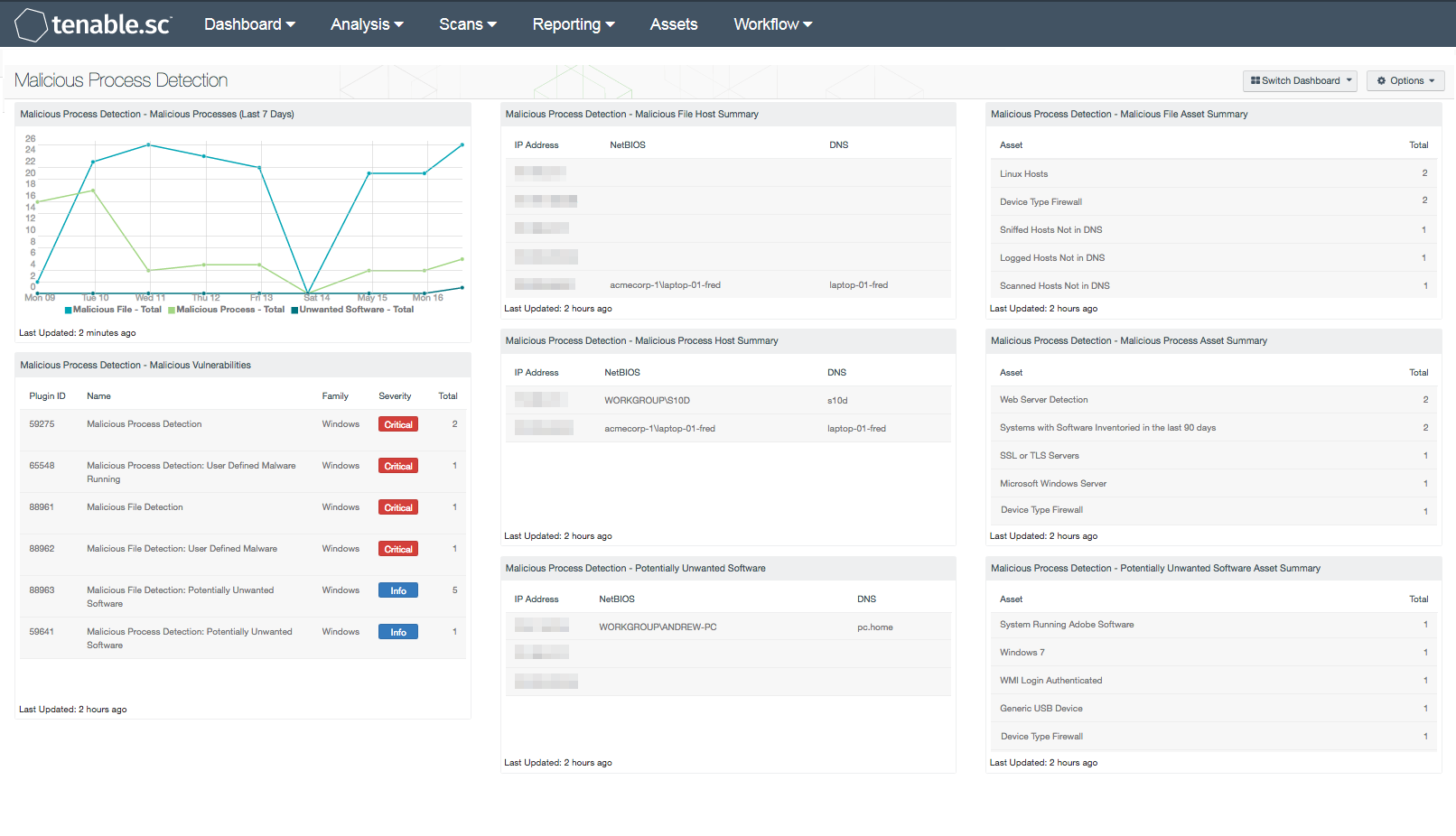
Much of today’s growth within organizations is fueled by demands in supporting cloud, mobile, and virtual solutions that can be complex and overwhelming for any organization to manage effectively. To support these changes, organizations should implement effective security solutions that provide continuous protection, which can help reduce the frequency of malware incidents. Using this dashboard, analysts and security teams will be able to quickly detect and mitigate malicious files or processes running on the network.
Many organizations still utilize existing security solutions that do not continuously monitor the network or have appropriate controls in place to monitor specific ports, services, or applications used by newer technologies. Malware attacks have become increasingly sophisticated, and provide the ability to bypass anti-virus client detection, thus rendering many anti-virus and anti-malware solutions ineffective. In addition, malware also has the ability to masquerade as a legitimate file or process, and stay undetected for long periods of time. Other entry points for malicious files can include email and portable devices. Implementing and enforcing encryption, spam controls, and device blocking policies can all help secure these entry points without compromising organizational needs.
Information presented within this dashboard can assist analysts and security teams with detecting malicious files, processes, and potentially unwanted software running on the network. Active scanning provides an in-depth examination of a host to discover malware or other potentially malicious processes. Using a credentialed Nessus scan, hash files are compared against known malware signatures cataloged by major anti-virus vendors. Nessus provides a report that shows which anti-virus vendor considers the file to be malicious. Security teams may find this information useful in determining whether existing anti-virus solutions are effective. Using this dashboard, organizations will be able to effectively detect and remediate malicious processes, ensure network security, and reduce overall risk.
This dashboard is available in the Tenable.sc Feed, a comprehensive collection of dashboards, reports, Assurance Report Cards, and assets. The dashboard can be easily located in the Tenable.sc Feed under the category Threat Detection & Vulnerability Assessments. The dashboard requirements are:
- Tenable.sc 5.3.2
- Nessus 8.6.0
Tenable provides organizations with proactive continuous monitoring from our unique sensors. Active scanning periodically examines hosts to determine the level of risk posed to the organization. Intelligent connectors leverage other security investments in the environment to integrate security data in order to improve context and analysis. Agent scanning enables organizations to rapidly assess hosts without the need for credentials. Passive listening detects hosts that were offline during active scans, and provides real-time monitoring to collect information about each host, and how the hosts are communicating on the network. Host data is analyzed and monitored to correlate real-time events, and identify malicious activity and anomalous behavior from users, operating systems, network devices, and other critical infrastructure. Each sensor delivers continuous visibility and critical context, enabling decisive action that transforms your security program from reactive to proactive.
The following components are included in this dashboard:
- Malicious Process Detection - Malicious Processes (Last 7 Days): The Malicious Processes chart presents a trend of malicious files, processes, and unwanted software on Windows systems over the last seven days. Malicious processes are identified by the md5sum of one or more running process on the remote Windows hosts that matches software known to violate some corporate policies. Information presented within this chart can be useful in detecting entry points for malicious processes. This chart can be modified to include additional or specific plugins based on the organization’s requirements.
- Malicious Process Detection - Malicious Vulnerabilities: The Malicious Vulnerabilities component presents a list of hosts reporting malicious files, processes, or unwanted software. Nessus can scan hosts for malicious processes or files, and provide additional details the analysts can use to detect, mitigate, and prevent the spread of malware on the network. Information presented within this component can include plugins that detect malicious processes, backdoors, and other types of malware across Windows, Linux, and Mac OS X systems. This information can be useful in correlating malicious files that have been detected by anti-virus clients. Using the Vulnerability Detail List tool, analysts can drill down to obtain additional information about the malicious file or process.
- Malicious Process Detection - Malicious File Host Summary: The Malicious File Host Summary component provides a summary of Windows systems that have detected one or more malicious files running on the host. Using the Nessus plugin 88693 (Malicious File Detection), hosts are scanned for the md5sum of one or more running processes that match known malware on remote Windows hosts. Hosts reporting malicious files should be reviewed immediately to determine the overall risk to the organization.
- Malicious Process Detection - Malicious Process Host Summary: The Malicious Process Host Summary component presents a list of Windows systems that have detected one or more malicious processes running on the host. Using the Nessus plugin 59275 (Malicious Process Detection), hosts are scanned for the md5sum of one or more running processes that match known malware on remote Windows hosts. Hosts reporting malicious processes should be reviewed immediately to determine the overall risk to the organization.
- Malicious Process Detection - Potentially Unwanted Software: The Potentially Unwanted Software component provides a summary of Windows systems that have detected potentially unwanted software running on the host. Using the Nessus plugin 59641 (Malicious Process Detection: Potentially Unwanted Software), hosts are scanned for the md5sum of one or more running processes that match known malware on remote Windows hosts. Unwanted software detected within this component should be reviewed thoroughly by the organization, as some software may be considered unauthorized and/or violate corporate policies.
- Malicious Process Detection - Malicious File Asset Summary: The Malicious File Asset Summary component provides a summary of Windows systems that have detected one or more malicious files running on the host. Using the Nessus plugin 88693 (Malicious File Detection), hosts are scanned for the md5sum of one or more running processes that match known malware on remote Windows hosts. Hosts reporting malicious files should be reviewed immediately to determine the overall risk to the organization.
- Malicious Process Detection - Malicious Process Asset Summary: The Malicious Process Asset Summary component provides a list of Windows systems that have detected one or more malicious processes running on the host. Using the Nessus plugin 59275 (Malicious Process Detection), hosts are scanned for the md5sum of one or more running processes that match known malware on remote Windows hosts. Hosts reporting malicious processes should be reviewed immediately to determine the overall risk to the organization.
- Malicious Process Detection - Potentially Unwanted Software Asset Summary: The Potentially Unwanted Software Asset Summary component provides a list of assets that have detected one or more potentially unwanted software running on the host. Using the Nessus plugin 59641 (Malicious Process Detection: Potentially Unwanted Software), hosts are scanned for the md5sum of one or more running processes that match known malware on remote Windows hosts. Unwanted software detected within this component should be reviewed thoroughly by the organization, as some software may be considered unauthorized and/or violate corporate policies.